7  APIs and Access Patterns

FastAPI, OGC standards, and designing spatial services that don’t fall over

7.1 The puzzle

A city planning department built a spatial API to serve parcel boundary lookups and zoning queries. During the initial rollout — 100 concurrent users, mostly internal — response times averaged 180 ms. Fast enough. The planning director approved public access.

Six weeks later, a development application triggered a surge of public interest. Request volume hit 1,000 concurrent users. The API fell over completely: response times climbed past 30 seconds, then the service stopped responding. The infrastructure team provisioned two additional servers. Response times dropped to 25 seconds. They provisioned four more servers. Twenty seconds.

The problem was not hardware. It was that every request was executing a full spatial join: for each incoming point coordinate, the API ran a PostGIS query that joined the parcel table (2.3 million rows) against the zoning table (47,000 polygons), filtered by spatial containment, and returned the result. At 100 req/s, the database was comfortably handling isolated queries. At 1,000 req/s, the join was executing 1,000 times per second across the same tables. Each join was independent; none could reuse any intermediate result from any other. The work scaled linearly with requests.

The fix took one afternoon. A materialised view pre-computed the join — each parcel row already contained its zoning attributes, refreshed nightly. A Redis cache sat in front of the database layer, caching parcel lookups by grid cell for 60 seconds. After the materialised view and cache were deployed, average response time at 1,000 req/s was 12 ms. No additional hardware.

The cost of the original design was not visible at low request rates. It was structural: the API’s design assumed that each request was a one-off computation, rather than one of many requests for the same underlying data pattern. Understanding where the cost actually is — and whether it scales with requests or with data — is the architectural question this chapter addresses.


7.2 REST vs OGC: the standards layer

Most spatial services could be built as arbitrary REST APIs: POST a coordinate, receive JSON. Many are. But spatial data services have a long history of standardisation efforts, and those standards matter when your consumers are other organisations, governments, or open-source GIS tools.

The Open Geospatial Consortium (OGC) defines a set of web service standards for serving spatial data. The current generation — OGC API standards — replaces the older WFS/WMS family with REST-based, OpenAPI-described interfaces.

7.2.1 OGC API Features

OGC API Features (formerly WFS) defines a standard way to serve vector feature collections over HTTP. The conformance requirements specify the URL patterns, query parameters, and response formats that a conforming server must support.

Key endpoints in a conforming OGC API Features server:

Endpoint Description
GET / Landing page with links to capabilities
GET /conformance List of OGC conformance classes the server implements
GET /collections List of available feature collections
GET /collections/{collectionId} Metadata for a specific collection
GET /collections/{collectionId}/items Features in the collection (supports bbox, datetime, limit, offset)
GET /collections/{collectionId}/items/{featureId} A single feature by ID

The bbox parameter is standardised: bbox=minLon,minLat,maxLon,maxLat. Clients that understand OGC API Features can query any conforming server without knowing anything specific about the underlying data.

7.2.2 OGC API Maps

OGC API Maps (successor to WMS) serves rendered map images. The interface is similar in structure but returns raster tiles or images rather than feature data. For applications that need pre-rendered cartographic output rather than raw feature geometry, OGC API Maps is appropriate.

7.2.3 Why conformance matters

If you are building an internal API consumed only by your own frontend, OGC conformance is an engineering overhead you may not need. If your consumers include:

  • QGIS or ArcGIS users who expect a standard WFS/OGC endpoint
  • Partner organisations whose systems are configured to query OGC-conforming services
  • Open data portals that harvest from conforming endpoints
  • Any downstream system that will be configured once and must work without changes as your data evolves

…then conformance buys you interoperability without custom integration work on either side.

Conformance is a binary claim supported by a test suite. OGC provides the TEAM Engine test harness; a conforming server must pass the relevant core and extension tests. Do not claim conformance without running the tests.


7.3 FastAPI for spatial services

FastAPI is a Python web framework built on Starlette and Pydantic, designed for high-performance APIs with automatic OpenAPI schema generation. It is appropriate for spatial services because Pydantic’s type system handles the validation complexity of geographic data cleanly, and its async support makes it efficient under concurrent load.

7.3.1 Pydantic schemas for spatial responses

GeoJSON is the standard interchange format for spatial features in APIs. A Pydantic model for a GeoJSON Feature response looks like:

# schemas.py
from pydantic import BaseModel, Field
from typing import Any, Literal, Optional

class Point(BaseModel):
    type: Literal["Point"]
    coordinates: list[float]   # [longitude, latitude] or [lon, lat, elevation]

class Polygon(BaseModel):
    type: Literal["Polygon"]
    coordinates: list[list[list[float]]]   # rings of [lon, lat] pairs

# Union for heterogeneous geometry types
Geometry = Point | Polygon

class Feature(BaseModel):
    type: Literal["Feature"]
    id: Optional[str | int] = None
    geometry: Geometry
    properties: dict[str, Any]

class FeatureCollection(BaseModel):
    type: Literal["FeatureCollection"]
    features: list[Feature]
    # OGC API Features extensions
    number_matched:  Optional[int]  = Field(None, alias="numberMatched")
    number_returned: Optional[int]  = Field(None, alias="numberReturned")
    links:           Optional[list] = None

    class Config:
        populate_by_name = True

These models validate inputs, serialise outputs, and appear directly in the auto-generated OpenAPI documentation. Pydantic validates that coordinates contains the right number of floats, that type is the correct literal, and that required fields are present — before your route handler ever runs.

7.3.2 Dependency injection for database connections

FastAPI’s dependency injection system is the clean way to manage database connection pools across requests. Each request gets a connection from the pool; the dependency handles acquisition and release:

# database.py
from contextlib import asynccontextmanager
from typing import AsyncGenerator
import asyncpg

DATABASE_URL = "postgresql://user:pass@localhost:5432/spatial_db"

pool: asyncpg.Pool | None = None

async def get_pool() -> asyncpg.Pool:
    global pool
    if pool is None:
        pool = await asyncpg.create_pool(DATABASE_URL, min_size=5, max_size=20)
    return pool

async def get_connection() -> AsyncGenerator[asyncpg.Connection, None]:
    p = await get_pool()
    async with p.acquire() as conn:
        yield conn
# routes.py
from fastapi import APIRouter, Depends, Query, HTTPException
from typing import Annotated
import asyncpg
from .database import get_connection
from .schemas import FeatureCollection, Feature, Polygon

router = APIRouter()

Connection = Annotated[asyncpg.Connection, Depends(get_connection)]

@router.get(
    "/collections/parcels/items",
    response_model=FeatureCollection,
    summary="Return parcels within a bounding box",
)
async def get_parcels_in_bbox(
    conn: Connection,
    bbox: str = Query(
        ...,
        description="Bounding box: minLon,minLat,maxLon,maxLat",
        example="-122.45,37.75,-122.40,37.78",
    ),
    limit: int = Query(100, ge=1, le=1000),
    offset: int = Query(0, ge=0),
):
    try:
        min_lon, min_lat, max_lon, max_lat = map(float, bbox.split(","))
    except ValueError:
        raise HTTPException(status_code=400, detail="Invalid bbox format")

    rows = await conn.fetch(
        """
        SELECT
            parcel_id,
            zoning_code,
            area_m2,
            ST_AsGeoJSON(geom)::json AS geometry
        FROM parcels_with_zoning   -- materialised view
        WHERE geom && ST_MakeEnvelope($1, $2, $3, $4, 4326)
        ORDER BY parcel_id
        LIMIT $5 OFFSET $6
        """,
        min_lon, min_lat, max_lon, max_lat, limit, offset,
    )

    features = [
        Feature(
            type="Feature",
            id=str(row["parcel_id"]),
            geometry=row["geometry"],
            properties={
                "parcel_id":   row["parcel_id"],
                "zoning_code": row["zoning_code"],
                "area_m2":     float(row["area_m2"]),
            },
        )
        for row in rows
    ]

    count_row = await conn.fetchrow(
        """
        SELECT COUNT(*) AS n
        FROM parcels_with_zoning
        WHERE geom && ST_MakeEnvelope($1, $2, $3, $4, 4326)
        """,
        min_lon, min_lat, max_lon, max_lat,
    )

    return FeatureCollection(
        type="FeatureCollection",
        features=features,
        numberMatched=count_row["n"],
        numberReturned=len(features),
    )

The && operator in the PostGIS query is the bounding box overlap operator — it uses the GIST index and is far faster than a full geometry intersection for the initial filter. This is the first of the access pattern choices that directly affects query performance.


7.4 Access patterns and query plans

The query pattern — point-in-polygon, bounding-box, nearest-neighbour — determines the query plan, and the query plan determines whether the database index is used. Choosing the wrong operator can turn an indexed lookup into a full sequential scan.

7.4.1 Bounding-box queries

The && operator tests whether two bounding boxes overlap. PostGIS stores a bounding-box index (GIST) on geometry columns. A && query uses the index directly and is extremely fast, even on large tables.

-- Fast: uses GIST index on bounding boxes
-- Returns features whose bounding boxes overlap the query envelope
SELECT parcel_id, geom
FROM parcels
WHERE geom && ST_MakeEnvelope(-122.45, 37.75, -122.40, 37.78, 4326);

For most use cases — map tiles, bounding-box feature queries — this is sufficient. The bounding box of a polygon is an approximation of its extent; features near the boundary of the query envelope may have overlapping bounding boxes but not overlapping geometries. A second-pass exact geometry test (ST_Intersects) can be applied to the bounding-box candidates if precision is required.

7.4.2 Point-in-polygon

Testing whether a specific point falls inside a polygon requires an exact geometry test. ST_Contains and ST_Within both perform this test, but without a bounding-box pre-filter they scan all candidate geometries.

-- Slow: full table scan if used alone
SELECT parcel_id, zoning_code
FROM parcels
WHERE ST_Contains(geom, ST_SetSRID(ST_Point(-122.42, 37.76), 4326));

-- Fast: bounding-box pre-filter using the index, then exact test
SELECT parcel_id, zoning_code
FROM parcels
WHERE geom && ST_SetSRID(ST_Point(-122.42, 37.76), 4326)
  AND ST_Contains(geom, ST_SetSRID(ST_Point(-122.42, 37.76), 4326));

PostGIS applies the && pre-filter automatically in most spatial operator implementations — ST_Contains internally calls the bounding-box test first. But be explicit: understanding why the bounding-box pre-filter matters makes you less likely to accidentally bypass it.

7.4.3 Nearest-neighbour

Finding the K nearest features to a query point. ST_Distance computes exact Euclidean or geodetic distance; using it directly in a WHERE clause or ORDER BY requires computing distance to every row.

-- Slow: computes distance to all rows, sorts, takes top K
SELECT parcel_id, ST_Distance(geom::geography, ref::geography) AS dist
FROM parcels,
     ST_SetSRID(ST_Point(-122.42, 37.76), 4326)::geography AS ref
ORDER BY dist
LIMIT 5;

-- Fast: uses GIST index with <-> operator (KNN index scan)
SELECT parcel_id
FROM parcels
ORDER BY geom <-> ST_SetSRID(ST_Point(-122.42, 37.76), 4326)
LIMIT 5;

The <-> operator is the PostGIS KNN (K-nearest-neighbour) operator. It uses the GIST index to perform an approximate nearest-neighbour search, then refines the result. For most point datasets it is orders of magnitude faster than the ST_Distance approach.

ST_DWithin — test whether two geometries are within a specified distance — is the correct operator for radius queries. It uses the spatial index and is consistently faster than ST_Distance(a, b) < threshold:

-- Correct: uses spatial index
SELECT parcel_id
FROM parcels
WHERE ST_DWithin(
    geom::geography,
    ST_SetSRID(ST_Point(-122.42, 37.76), 4326)::geography,
    500   -- metres (geography SRID required for metric distances)
);

-- Incorrect: bypasses index optimisation
SELECT parcel_id
FROM parcels
WHERE ST_Distance(
    geom::geography,
    ST_SetSRID(ST_Point(-122.42, 37.76), 4326)::geography
) < 500;

The practical rule: use && for bounding-box filters, ST_DWithin for radius queries, <-> for nearest-neighbour ordering. Avoid ST_Distance in WHERE clauses. EXPLAIN ANALYZE each query during development — look for Bitmap Index Scan or Index Scan on the geometry column, not Seq Scan.


7.5 Caching

Caching reduces the number of queries that reach the database by serving previously computed results. For spatial APIs, two layers matter: the database layer (materialised views) and the API layer (Redis or HTTP caching).

7.5.1 Materialised views

A materialised view stores the result of a query as a physical table, refreshed on demand or on a schedule. The view from the opening example — parcels_with_zoning — pre-computes the join between parcels and zoning polygons once (or nightly), so every API request reads from a flat table instead of executing a join.

-- Create the materialised view
CREATE MATERIALIZED VIEW parcels_with_zoning AS
SELECT
    p.parcel_id,
    p.geom,
    p.area_m2,
    z.zoning_code,
    z.zoning_description
FROM parcels p
JOIN zoning z ON ST_Within(p.geom, z.geom)
WITH DATA;

-- Create GIST index on the materialised view
CREATE INDEX idx_parcels_zoning_geom ON parcels_with_zoning USING GIST (geom);

-- Refresh nightly (or as required by data freshness requirements)
REFRESH MATERIALIZED VIEW CONCURRENTLY parcels_with_zoning;

REFRESH MATERIALIZED VIEW CONCURRENTLY replaces the view data without locking reads, making it safe to refresh during business hours. It requires that the view have a unique index.

The cost of the materialised view is storage and the refresh job. The benefit is that every API request against the view pays for a simple indexed lookup, not a join. For data that is updated infrequently (zoning boundaries change rarely; parcel boundaries change more often but still rarely), this tradeoff is nearly always correct.

7.5.2 API-layer caching with Redis

Materialised views eliminate database join cost but do not eliminate database query cost. For an API serving the same bounding boxes repeatedly — map viewers tiled at fixed zoom levels generate predictable, repeating bounding-box queries — an API-layer cache eliminates database round-trips entirely for cache hits.

# cache.py
import redis.asyncio as redis
import json
from typing import Optional

REDIS_URL       = "redis://localhost:6379"
CACHE_TTL_S     = 60   # cache spatial results for 60 seconds

_redis: redis.Redis | None = None

async def get_redis() -> redis.Redis:
    global _redis
    if _redis is None:
        _redis = redis.from_url(REDIS_URL, decode_responses=True)
    return _redis

async def cache_get(key: str) -> Optional[dict]:
    r = await get_redis()
    value = await r.get(key)
    return json.loads(value) if value else None

async def cache_set(key: str, value: dict, ttl: int = CACHE_TTL_S) -> None:
    r = await get_redis()
    await r.set(key, json.dumps(value), ex=ttl)

The cache key for a bounding-box query is the quantised bbox plus any other query parameters. Quantising coordinates (rounding to 4 decimal places, approximately 11-metre precision) increases cache hit rate by collapsing nearly-identical queries:

def make_cache_key(bbox: str, limit: int) -> str:
    parts = [round(float(x), 4) for x in bbox.split(",")]
    return f"parcels:bbox:{':'.join(str(p) for p in parts)}:limit:{limit}"

7.5.3 HTTP cache headers

For GET endpoints serving public data, HTTP cache headers allow CDN and browser caching with no application code changes:

from fastapi import Response

@router.get("/collections/parcels/items")
async def get_parcels(response: Response, ...):
    response.headers["Cache-Control"] = "public, max-age=60"
    response.headers["Vary"] = "Accept"
    ...

7.5.4 Simulated response time: cached vs uncached

Code
"""Chapter 6: simulated cache vs no-cache response time under load."""
import numpy as np
import matplotlib.pyplot as plt

# Named constants
N_REQUEST_LEVELS     = 40
MAX_REQUESTS_S       = 800
CACHE_HIT_RATE       = 0.60
BASE_LATENCY_MS      = 8.0    # baseline uncached response (ms) at low load
CACHE_LATENCY_MS     = 2.0    # Redis cache hit latency (ms)
DB_SATURATION_RPS    = 300    # requests/s at which DB starts to saturate
DB_SAT_STEEPNESS     = 0.018  # controls how sharply saturation rises
SEED                 = 42

np.random.seed(SEED)

request_rates = np.linspace(10, MAX_REQUESTS_S, N_REQUEST_LEVELS)

def db_latency(rps: np.ndarray, hit_rate: float) -> np.ndarray:
    """Model database latency as a function of effective DB request rate.
    Below saturation: roughly flat at BASE_LATENCY_MS.
    Near and above saturation: grows steeply (queueing theory: M/M/1 model).
    """
    db_rps = rps * (1.0 - hit_rate)  # only cache misses reach the DB
    # M/M/1 mean response time: T = 1/mu * 1/(1 - rho), rho = lambda/mu
    mu   = DB_SATURATION_RPS           # service rate (capacity)
    rho  = np.clip(db_rps / mu, 0, 0.98)
    t_db = BASE_LATENCY_MS / (1.0 - rho)
    return t_db

# No cache: every request hits the database
uncached = db_latency(request_rates, hit_rate=0.0)
# With cache: (1 - hit_rate) fraction of requests hit the database
db_part   = db_latency(request_rates, hit_rate=CACHE_HIT_RATE)
cached    = CACHE_HIT_RATE * CACHE_LATENCY_MS + (1 - CACHE_HIT_RATE) * db_part

# Add small jitter to simulate measurement noise
uncached += np.random.normal(0, 2.0, N_REQUEST_LEVELS)
cached   += np.random.normal(0, 0.5, N_REQUEST_LEVELS)
uncached  = np.clip(uncached, BASE_LATENCY_MS, None)
cached    = np.clip(cached, CACHE_LATENCY_MS, None)

fig, ax = plt.subplots(figsize=(9, 5), dpi=150)

ax.plot(request_rates, uncached, color="#d52a2a", linewidth=2.0, label="No cache")
ax.plot(request_rates, cached,   color="#111111", linewidth=2.0,
        label=f"Cache (hit rate = {int(CACHE_HIT_RATE * 100)}%)")

ax.axvline(DB_SATURATION_RPS, color="#888888", linewidth=1.0, linestyle=":",
           label=f"DB saturation ≈ {DB_SATURATION_RPS} req/s")
ax.axvline(DB_SATURATION_RPS / (1 - CACHE_HIT_RATE), color="#888888",
           linewidth=1.0, linestyle="--",
           label=f"Effective DB saturation with cache ≈ {int(DB_SATURATION_RPS / (1 - CACHE_HIT_RATE))} req/s")

ax.set_xlabel("Incoming request rate (req/s)")
ax.set_ylabel("Mean response time (ms)")
ax.set_ylim(0, None)
ax.legend(fontsize=9)
ax.spines["top"].set_visible(False)
ax.spines["right"].set_visible(False)
ax.set_title("API response time under load: cached vs uncached")

plt.tight_layout()
plt.savefig("_assets/ch06-cache-response-time.png", dpi=150, bbox_inches="tight")
plt.show()
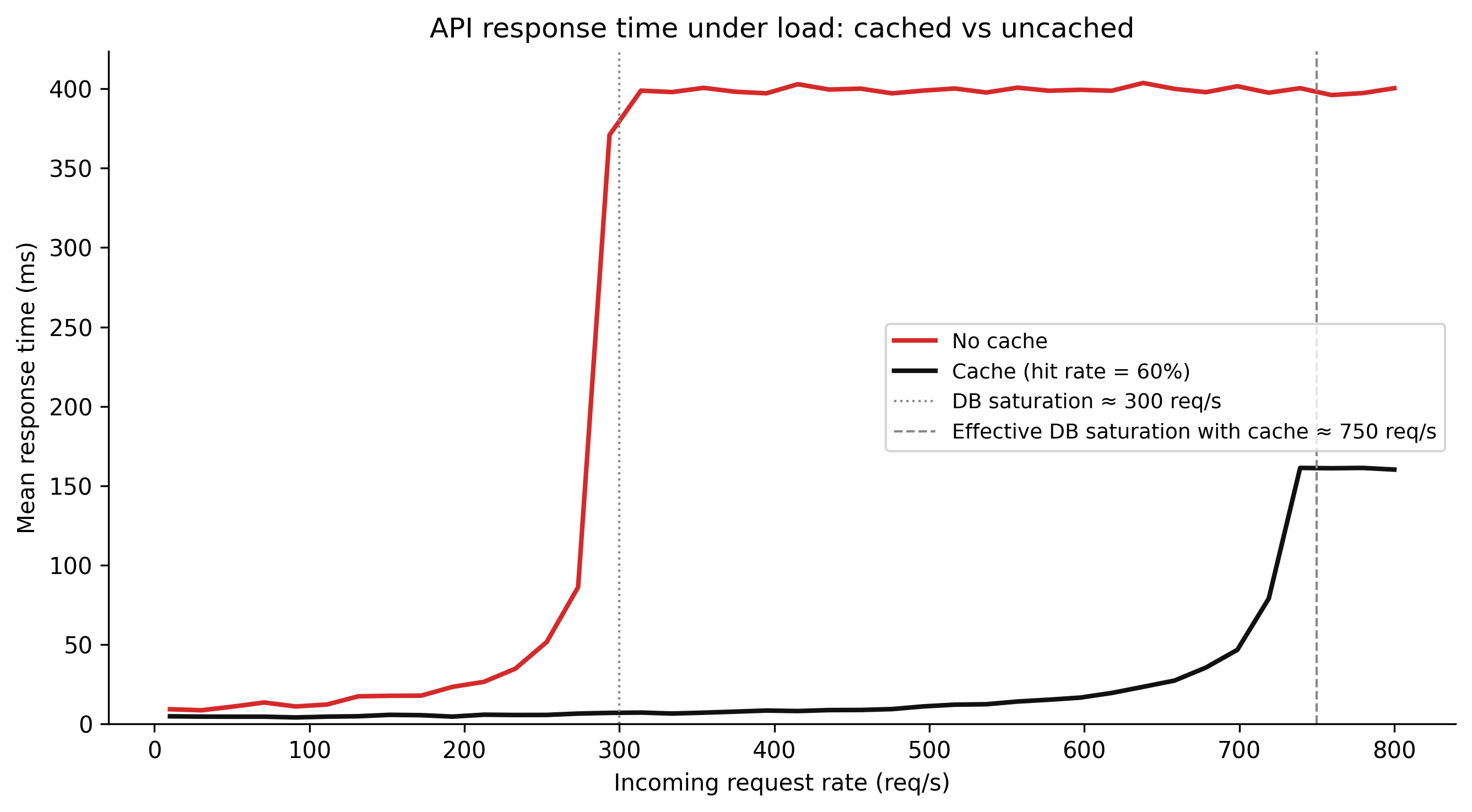
Figure 7.1: Figure 6.1. Simulated API response time under increasing request load with and without a cache. Without caching, response time grows steeply as the database becomes the bottleneck: each request executes a full spatial query, and database contention increases nonlinearly near saturation. With caching (60% hit rate), most requests are served from Redis at low, flat latency; only cache misses reach the database. The database sees roughly 40% of the total request rate, delaying the onset of saturation substantially.

7.6 Rate limiting and pagination

7.6.1 Cursor-based pagination

Offset-based pagination (LIMIT 100 OFFSET 500) is standard in SQL but breaks down at scale. The database must scan and discard OFFSET rows before returning the page. At OFFSET 50000, the database discards 50,000 rows for every page request. Performance degrades linearly with page depth. For large spatial datasets — a national parcel register with millions of features — deep pagination is slow and expensive.

Cursor-based pagination replaces the offset with a pointer to the last record seen. The next page query uses that pointer as a WHERE clause condition:

-- Page 1: return features ordered by parcel_id, limit 100
SELECT parcel_id, geom, zoning_code
FROM parcels_with_zoning
WHERE geom && ST_MakeEnvelope($1, $2, $3, $4, 4326)
ORDER BY parcel_id
LIMIT 100;
-- → last parcel_id returned: 48372

-- Page 2: use last parcel_id as cursor
SELECT parcel_id, geom, zoning_code
FROM parcels_with_zoning
WHERE geom && ST_MakeEnvelope($1, $2, $3, $4, 4326)
  AND parcel_id > 48372    -- cursor condition
ORDER BY parcel_id
LIMIT 100;

Page 2 requires the database to find the first row with parcel_id > 48372 using the index on parcel_id, then scan forward 100 rows. The cost is constant regardless of page depth — no rows are discarded.

The OGC API Features standard supports cursor-based pagination via next links in the response. Include a next URL in your response that encodes the cursor:

from urllib.parse import urlencode

def make_next_link(base_url: str, cursor: str, bbox: str, limit: int) -> str:
    params = urlencode({"bbox": bbox, "limit": limit, "cursor": cursor})
    return f"{base_url}?{params}"

The client follows the next link without needing to know anything about cursor encoding. The server decodes the cursor and executes the appropriate WHERE condition.

7.6.2 Rate limiting middleware

Rate limiting protects the database from clients that send requests faster than your infrastructure can handle. For a public spatial API, rate limiting is not optional — a single misconfigured client polling at 100 req/s can saturate the database for all other clients.

FastAPI rate limiting is most cleanly implemented as middleware using a token bucket or sliding window counter in Redis:

# middleware.py
import time
import redis.asyncio as redis
from fastapi import Request, Response
from starlette.middleware.base import BaseHTTPMiddleware
from starlette.responses import JSONResponse

class RateLimitMiddleware(BaseHTTPMiddleware):
    def __init__(self, app, requests_per_minute: int = 60):
        super().__init__(app)
        self.rpm     = requests_per_minute
        self.window  = 60   # seconds

    async def dispatch(self, request: Request, call_next):
        client_ip = request.client.host
        r = await get_redis()

        key      = f"ratelimit:{client_ip}"
        current  = await r.incr(key)
        if current == 1:
            await r.expire(key, self.window)

        if current > self.rpm:
            return JSONResponse(
                status_code=429,
                content={"detail": "Rate limit exceeded. Retry after 60 seconds."},
                headers={"Retry-After": "60"},
            )

        response = await call_next(request)
        response.headers["X-RateLimit-Limit"]     = str(self.rpm)
        response.headers["X-RateLimit-Remaining"] = str(max(0, self.rpm - current))
        return response

For authenticated APIs, rate limit by API key rather than IP — IP-based limiting breaks clients behind NAT. Expose the limit and remaining count in response headers so well-behaved clients can self-throttle.


7.7 What to try

TipWhat to try
  1. Change CACHE_HIT_RATE from 0.60 to 0.90. What happens to the request rate at which the cached API saturates? This is the leverage point: improving cache hit rate (through better key design, larger cache, longer TTL) is often more effective than provisioning hardware.

  2. Set N_REQUESTS to 500 and UNCACHED_LATENCY_MS to 200. This models a more expensive spatial query. At what request rate does the uncached API cross 1,000 ms? What cache hit rate would be needed to keep the cached API under 50 ms at the same load?

  3. Set CACHE_LATENCY_MS to 50 (simulating a remote Redis instance with network latency). How does the cached API’s performance change at low request rates? At what hit rate does caching stop being beneficial?

# --- Try changing these parameters ---
N_REQUESTS          = 200      # number of simulated requests (try 500)
CACHE_HIT_RATE      = 0.60     # fraction served from cache (try 0.90)
BASE_LATENCY_MS     = 8.0      # database query latency at low load (ms)
CACHE_LATENCY_MS    = 2.0      # Redis hit latency (ms, try 50 for remote cache)
UNCACHED_LATENCY_MS = 8.0      # alias for base_latency in uncached scenario

import numpy as np
import matplotlib.pyplot as plt

np.random.seed(42)

DB_SATURATION_RPS = 300
request_rates = np.linspace(10, 800, 40)

def mean_response(rps, hit_rate, base_ms, cache_ms):
    db_rps = rps * (1.0 - hit_rate)
    mu  = DB_SATURATION_RPS
    rho = np.clip(db_rps / mu, 0, 0.98)
    t_db = base_ms / (1.0 - rho)
    return hit_rate * cache_ms + (1.0 - hit_rate) * t_db

uncached = mean_response(request_rates, 0.0, BASE_LATENCY_MS, CACHE_LATENCY_MS)
cached   = mean_response(request_rates, CACHE_HIT_RATE, BASE_LATENCY_MS, CACHE_LATENCY_MS)

uncached += np.random.normal(0, 1.5, len(request_rates))
cached   += np.random.normal(0, 0.4, len(request_rates))
uncached  = np.clip(uncached, BASE_LATENCY_MS, None)
cached    = np.clip(cached, CACHE_LATENCY_MS, None)

fig, ax = plt.subplots(figsize=(9, 5))
ax.plot(request_rates, uncached, color="#d52a2a", linewidth=2, label="No cache")
ax.plot(request_rates, cached,   color="#111111", linewidth=2,
        label=f"Cache (hit rate={int(CACHE_HIT_RATE*100)}%)")
ax.axvline(DB_SATURATION_RPS, color="#aaaaaa", linestyle=":", linewidth=1,
           label=f"DB saturation ({DB_SATURATION_RPS} req/s)")
ax.set_xlabel("Request rate (req/s)")
ax.set_ylabel("Mean response time (ms)")
ax.set_ylim(0, None)
ax.legend(fontsize=8)
ax.spines["top"].set_visible(False)
ax.spines["right"].set_visible(False)
plt.tight_layout()
plt.show()

# Find where uncached and cached cross 500ms
threshold_ms = 500
uncached_sat = request_rates[np.searchsorted(uncached, threshold_ms)]
cached_sat   = request_rates[np.searchsorted(cached, threshold_ms)] \
               if cached.max() > threshold_ms else ">800"
print(f"Uncached exceeds {threshold_ms}ms at:   {uncached_sat:.0f} req/s")
print(f"Cached  exceeds {threshold_ms}ms at:    {cached_sat} req/s")
print(f"Cache hit rate: {CACHE_HIT_RATE:.0%}  |  "
      f"Cache latency: {CACHE_LATENCY_MS}ms  |  "
      f"DB base latency: {BASE_LATENCY_MS}ms")

7.8 Exercises

6.1 — Query plan analysis

You have a table sensor_readings with 50 million rows, a geometry column location (point geometries, SRID 4326), and a GIST index on location. Write three queries:

  1. Return all readings within a 1 km radius of a given point using ST_DWithin.
  2. Return the same results using ST_Distance(...) < 1000.
  3. Run EXPLAIN ANALYZE on both (or reason through the execution plan if you do not have a live database). Which uses the index? Why does ST_DWithin permit index use while ST_Distance in a WHERE clause typically does not?

6.2 — Materialised view design

A spatial API serves a /hotspots endpoint that returns the 10 cells in a hexagonal grid with the highest count of incident reports in the past 30 days. The underlying query joins incidents (2 million rows, updated every 15 minutes) with a hex_grid table (50,000 cells).

  1. Design a materialised view that pre-computes this result. What columns should it contain?
  2. At what refresh frequency should the view be refreshed, given that the underlying data updates every 15 minutes?
  3. A stakeholder requests that the endpoint show data “as of the last 30 minutes.” Can this requirement be satisfied with a materialised view? If not, what is the minimum change to the architecture?

6.3 — Pagination strategy

An OGC API Features endpoint serves a national parcel dataset with 8 million features. A client needs to download the complete dataset for an analysis job.

  1. The client uses offset-based pagination with limit=1000. Estimate the relative query cost of the first page vs the 8,000th page (last page). What is the total database work to download the complete dataset?
  2. Redesign the endpoint to use cursor-based pagination. Write the SQL for page 1 and for the page following a cursor value of parcel_id = 3850271.
  3. The client needs to download features sorted by area, not by parcel_id. What challenges does cursor-based pagination present for non-unique or non-indexed sort columns?

6.4 — Rate limit design

A public spatial API serves three client types: browser map viewers (burst requests, then idle), analysis scripts (sustained high-rate requests for dataset downloads), and monitoring agents (low, regular polling).

  1. A flat rate limit of 60 requests per minute is applied to all clients. Which client type is most adversely affected? Why?
  2. Design a tiered rate limit scheme: unauthenticated users, registered API key users, and bulk-download API key users. Specify limits and burst allowances for each tier.
  3. A client reports that their map viewer gets rate-limited during normal use. Diagnosis shows they are making 3 simultaneous tile requests per map pan. How would you modify the rate limit to accommodate this access pattern without raising the overall limit?

7.9 Build this

A complete FastAPI application serving parcel features from PostGIS via an OGC API Features-compatible endpoint. The application includes typed Pydantic schemas, a database connection pool, a Redis cache layer, cursor-based pagination, and OGC-compatible response structure with next links.

# app.py — complete FastAPI spatial service
# requires: pip install fastapi uvicorn asyncpg redis pydantic
# requires: PostGIS database with parcels table, Redis at localhost:6379
# run with: uvicorn app:app --reload

from __future__ import annotations

import json
from contextlib import asynccontextmanager
from typing import Annotated, Any, Literal, Optional
from urllib.parse import urlencode

import asyncpg
import redis.asyncio as aioredis
from fastapi import Depends, FastAPI, HTTPException, Query, Request, Response
from fastapi.responses import JSONResponse
from pydantic import BaseModel, Field
from starlette.middleware.base import BaseHTTPMiddleware

# ---------------------------------------------------------------------------
# Configuration
# ---------------------------------------------------------------------------

DATABASE_URL       = "postgresql://user:pass@localhost:5432/spatial_db"
REDIS_URL          = "redis://localhost:6379"
CACHE_TTL_S        = 60
REQUESTS_PER_MIN   = 120
API_TITLE          = "Spatial Parcel Service"
API_VERSION        = "1.0.0"

# ---------------------------------------------------------------------------
# Database and cache pools
# ---------------------------------------------------------------------------

db_pool: asyncpg.Pool | None         = None
redis_client: aioredis.Redis | None  = None

@asynccontextmanager
async def lifespan(app: FastAPI):
    global db_pool, redis_client
    db_pool      = await asyncpg.create_pool(DATABASE_URL, min_size=5, max_size=20)
    redis_client = aioredis.from_url(REDIS_URL, decode_responses=True)
    yield
    await db_pool.close()
    await redis_client.aclose()

app = FastAPI(title=API_TITLE, version=API_VERSION, lifespan=lifespan)

async def get_conn() -> asyncpg.Connection:
    async with db_pool.acquire() as conn:
        yield conn

async def get_redis() -> aioredis.Redis:
    return redis_client

Connection   = Annotated[asyncpg.Connection, Depends(get_conn)]
RedisClient  = Annotated[aioredis.Redis, Depends(get_redis)]

# ---------------------------------------------------------------------------
# Rate limiting middleware
# ---------------------------------------------------------------------------

class RateLimitMiddleware(BaseHTTPMiddleware):
    async def dispatch(self, request: Request, call_next):
        key     = f"ratelimit:{request.client.host}"
        r       = redis_client
        current = await r.incr(key)
        if current == 1:
            await r.expire(key, 60)
        if current > REQUESTS_PER_MIN:
            return JSONResponse(
                status_code=429,
                content={"detail": "Rate limit exceeded"},
                headers={"Retry-After": "60"},
            )
        resp = await call_next(request)
        resp.headers["X-RateLimit-Limit"]     = str(REQUESTS_PER_MIN)
        resp.headers["X-RateLimit-Remaining"] = str(max(0, REQUESTS_PER_MIN - current))
        return resp

app.add_middleware(RateLimitMiddleware)

# ---------------------------------------------------------------------------
# Pydantic schemas (OGC API Features compatible)
# ---------------------------------------------------------------------------

class Geometry(BaseModel):
    type: str
    coordinates: Any

class Link(BaseModel):
    href: str
    rel:  str
    type: str = "application/geo+json"

class Feature(BaseModel):
    type:       Literal["Feature"] = "Feature"
    id:         Optional[str]      = None
    geometry:   Geometry
    properties: dict[str, Any]

class FeatureCollection(BaseModel):
    type:             Literal["FeatureCollection"] = "FeatureCollection"
    features:         list[Feature]
    numberMatched:    Optional[int]                = None
    numberReturned:   Optional[int]                = None
    links:            list[Link]                   = Field(default_factory=list)

    class Config:
        populate_by_name = True

# ---------------------------------------------------------------------------
# OGC API landing page and conformance
# ---------------------------------------------------------------------------

@app.get("/", summary="Landing page")
async def landing_page(request: Request):
    base = str(request.base_url).rstrip("/")
    return {
        "title":       API_TITLE,
        "description": "OGC API Features — parcel and zoning data",
        "links": [
            {"href": f"{base}/conformance",           "rel": "conformance"},
            {"href": f"{base}/collections",           "rel": "data"},
            {"href": f"{base}/openapi.json",          "rel": "service-desc"},
        ],
    }

@app.get("/conformance", summary="OGC conformance classes")
async def conformance():
    return {
        "conformsTo": [
            "http://www.opengis.net/spec/ogcapi-features-1/1.0/conf/core",
            "http://www.opengis.net/spec/ogcapi-features-1/1.0/conf/geojson",
        ]
    }

@app.get("/collections", summary="Available feature collections")
async def collections(request: Request):
    base = str(request.base_url).rstrip("/")
    return {
        "collections": [
            {
                "id":    "parcels",
                "title": "Land parcels with zoning",
                "links": [{"href": f"{base}/collections/parcels/items",
                           "rel": "items", "type": "application/geo+json"}],
            }
        ]
    }

# ---------------------------------------------------------------------------
# Core endpoint: /features/within (bounding-box feature query)
# ---------------------------------------------------------------------------

@app.get(
    "/collections/parcels/items",
    response_model=FeatureCollection,
    summary="Return parcels within a bounding box (OGC API Features /items)",
)
async def get_features_within(
    request:  Request,
    response: Response,
    conn:     Connection,
    r:        RedisClient,
    bbox: str = Query(
        ...,
        description="minLon,minLat,maxLon,maxLat in EPSG:4326",
        example="-122.45,37.75,-122.40,37.78",
    ),
    limit:  int          = Query(100, ge=1, le=1000),
    cursor: Optional[str] = Query(None, description="Pagination cursor (parcel_id)"),
):
    # Parse and validate bbox
    try:
        min_lon, min_lat, max_lon, max_lat = map(float, bbox.split(","))
    except ValueError:
        raise HTTPException(status_code=400, detail="Invalid bbox: expected minLon,minLat,maxLon,maxLat")

    if not (-180 <= min_lon < max_lon <= 180 and -90 <= min_lat < max_lat <= 90):
        raise HTTPException(status_code=400, detail="bbox values out of range")

    # Cache key
    cursor_part = f":cursor:{cursor}" if cursor else ""
    cache_key   = f"parcels:{round(min_lon,4)}:{round(min_lat,4)}:{round(max_lon,4)}:{round(max_lat,4)}:limit:{limit}{cursor_part}"

    # Cache lookup
    cached = await r.get(cache_key)
    if cached:
        response.headers["X-Cache"] = "HIT"
        response.headers["Cache-Control"] = f"public, max-age={CACHE_TTL_S}"
        return FeatureCollection(**json.loads(cached))

    response.headers["X-Cache"] = "MISS"

    # Database query — cursor-based pagination
    if cursor:
        try:
            cursor_id = int(cursor)
        except ValueError:
            raise HTTPException(status_code=400, detail="Invalid cursor")
        rows = await conn.fetch(
            """
            SELECT parcel_id, zoning_code, area_m2,
                   ST_AsGeoJSON(geom)::json AS geometry
            FROM parcels_with_zoning
            WHERE geom && ST_MakeEnvelope($1, $2, $3, $4, 4326)
              AND parcel_id > $5
            ORDER BY parcel_id
            LIMIT $6
            """,
            min_lon, min_lat, max_lon, max_lat, cursor_id, limit,
        )
    else:
        rows = await conn.fetch(
            """
            SELECT parcel_id, zoning_code, area_m2,
                   ST_AsGeoJSON(geom)::json AS geometry
            FROM parcels_with_zoning
            WHERE geom && ST_MakeEnvelope($1, $2, $3, $4, 4326)
            ORDER BY parcel_id
            LIMIT $2
            """,
            min_lon, min_lat, max_lon, max_lat, limit,
        )

    # Total count (for numberMatched; run concurrently in production)
    count_row = await conn.fetchrow(
        """
        SELECT COUNT(*) AS n
        FROM parcels_with_zoning
        WHERE geom && ST_MakeEnvelope($1, $2, $3, $4, 4326)
        """,
        min_lon, min_lat, max_lon, max_lat,
    )

    features = [
        Feature(
            id=str(row["parcel_id"]),
            geometry=Geometry(**row["geometry"]),
            properties={
                "parcel_id":   row["parcel_id"],
                "zoning_code": row["zoning_code"],
                "area_m2":     float(row["area_m2"]),
            },
        )
        for row in rows
    ]

    # Build next link if there are more results
    links = []
    base  = str(request.base_url).rstrip("/")
    if len(rows) == limit:
        next_cursor = str(rows[-1]["parcel_id"])
        next_params = urlencode({"bbox": bbox, "limit": limit, "cursor": next_cursor})
        links.append(Link(
            href=f"{base}/collections/parcels/items?{next_params}",
            rel="next",
        ))

    result = FeatureCollection(
        features=features,
        numberMatched=count_row["n"],
        numberReturned=len(features),
        links=links,
    )

    # Write to cache
    await r.set(cache_key, result.model_dump_json(), ex=CACHE_TTL_S)
    response.headers["Cache-Control"] = f"public, max-age={CACHE_TTL_S}"

    return result
The database setup this service expects:

-- Base tables (simplified)
CREATE TABLE parcels (
    parcel_id  BIGINT PRIMARY KEY,
    geom       GEOMETRY(POLYGON, 4326) NOT NULL,
    area_m2    NUMERIC(12, 2)
);

CREATE TABLE zoning (
    zone_id              SERIAL PRIMARY KEY,
    geom                 GEOMETRY(MULTIPOLYGON, 4326) NOT NULL,
    zoning_code          TEXT NOT NULL,
    zoning_description   TEXT
);

CREATE INDEX idx_parcels_geom ON parcels USING GIST (geom);
CREATE INDEX idx_zoning_geom  ON zoning  USING GIST (geom);

-- Materialised view: pre-computed join
CREATE MATERIALIZED VIEW parcels_with_zoning AS
SELECT
    p.parcel_id,
    p.geom,
    p.area_m2,
    z.zoning_code,
    z.zoning_description
FROM parcels p
JOIN zoning z ON ST_Within(p.geom, z.geom)
WITH DATA;

CREATE UNIQUE INDEX idx_pwz_parcel_id ON parcels_with_zoning (parcel_id);
CREATE INDEX        idx_pwz_geom      ON parcels_with_zoning USING GIST (geom);

-- Refresh nightly at 02:00; use CONCURRENTLY to avoid read locks
-- REFRESH MATERIALIZED VIEW CONCURRENTLY parcels_with_zoning;

Run with uvicorn app:app --host 0.0.0.0 --port 8000. The landing page at GET / returns OGC-compatible links. Parcel features are served at GET /collections/parcels/items?bbox=-122.45,37.75,-122.40,37.78. Follow the next link in the response to paginate.