2  Data Architecture

Schemas, catalogues, and the decisions that outlast the sprint

2.1 The puzzle

In 2021 a team at a mid-sized environmental consultancy built a pipeline to ingest satellite-derived land-cover classifications for a single country. The work took three weeks. The data was stored as GeoJSON files, one file per acquisition date, in a flat directory on a shared network drive. Queries ran in seconds. The team was happy.

Two years later the same pipeline was running for 47 countries, covering five years of acquisitions. The directory held 11,000 files. Storage was 1.4 TB. The queries that used to take seconds now took — depending on the question — somewhere between four minutes and “it just timed out.” The team had added two engineers in the interim, neither of whom could tell you which schema version a given file was on, because the schema had evolved four times and the changes were not documented anywhere.

The data was all there. The system was not queryable.

This was not a compute problem. The team had moved the files to a cloud VM with 64 cores and 256 GB of RAM, and the queries were still slow. The issue was not what the machine was doing — it was what it was being asked to do. Every query that asked “show me all grassland pixels in country X between these two dates” had to open all 11,000 files, read each one fully into memory, check whether the date and country matched, and then discard it if it did not. The ratio of data read to data used was approximately 200:1.

Three decisions made this outcome nearly inevitable from the start: the choice of storage format, the absence of a partitioning strategy, and the lack of any schema governance. None of those decisions felt like decisions at the time. That is the point of this chapter.


2.2 The three decisions that matter

Every data architecture for spatial analytics comes down to three choices. Most teams spend their time on the wrong things — the orchestration framework, the cloud provider, the BI tool — while leaving these three implicit.

Storage format determines how data is physically written to disk and how a reader must traverse it to answer a query. A format that requires reading the whole file to find one row is a fundamentally different object than a format that can skip to the right row group. This choice sets a ceiling on query performance that no amount of compute can lift.

Schema design determines what questions the data can answer and how many joins it takes to answer them. A schema designed for data entry (fully normalised, no redundancy) is usually wrong for analytics (wide denormalised tables, redundant but query-efficient). Spatial data has an extra dimension: geometry columns add size, indexing requirements, and type system pressure that a naive relational design ignores.

Partitioning strategy determines how data is physically organised so that queries can avoid reading the parts they do not need. A query that asks for data from January 2024 should not have to open a file from January 2020. Whether it does depends entirely on how you partitioned.

Everything else — transformation logic, query engines, API design — follows from these three. Get them right and the rest is implementation detail. Get them wrong and you will spend the next two years trying to compensate with compute.


2.3 Storage formats for spatial data

Three formats dominate spatial data engineering: GeoJSON, Shapefile, and GeoParquet. Each represents a different era of thinking about what “storing data” means.

2.3.1 GeoJSON

GeoJSON is a text-based format: coordinates and properties encoded as JSON, readable by any text editor, supported by every GIS tool written in the last fifteen years. This is its appeal and its problem.

Text encoding means every number is stored as a string. A float64 coordinate like -123.456789 takes 11 bytes as text and 8 bytes as a binary double. For a file with 10 million coordinate pairs, that difference is 30 MB — not catastrophic, but not free. More importantly, GeoJSON is a row-oriented format: each feature is a self-contained JSON object. To read one property from all features, you read the entire file and discard most of it.

GeoJSON also has no native support for partitioning. You can split your data across multiple files by naming convention, but there is no metadata that tells a query engine “file A covers dates 2020–2021, file B covers 2022–2023.” The query engine has to open everything and check.

For small datasets and data exchange, GeoJSON is fine. For anything that needs to be queried repeatedly at scale, it is the wrong choice.

2.3.2 Shapefile

The Shapefile format was designed by Esri in the early 1990s. It is still the most widely exchanged format in the GIS industry, which tells you more about inertia than about quality.

A Shapefile is actually a bundle of at least three files (.shp for geometry, .dbf for attributes, .prj for projection), which makes it unreliable to move and easy to corrupt. The .dbf format imposes a 10-character limit on field names, which means a column called measurement_date becomes msrmnt_dt and requires a lookup table to interpret. Null values are represented as empty strings in numeric fields, which some readers interpret as zero. Character encoding is not standardised.

None of these are obscure edge cases. They are normal consequences of using the format.

Shapefiles are row-oriented, like GeoJSON. They offer no predicate pushdown — no ability to skip to relevant data without reading irrelevant data. For a 2GB Shapefile, every query reads 2GB.

Use Shapefiles only when you are receiving data from a third party that will not produce anything else, or when you need to hand off data to a GIS analyst whose tools require it.

2.3.3 GeoParquet

GeoParquet is the current answer. It is an extension of Apache Parquet — a columnar binary format designed for analytical workloads — with a standardised metadata convention for encoding geometry columns.

Columnar storage means each column is stored contiguously on disk. A query that reads one column from a table with fifty columns reads approximately 1/50th of the file. For spatial analytics, where you frequently query a small number of attributes across many rows, the difference is dramatic.

Parquet files also contain row group statistics: for each row group, the file stores the minimum and maximum value of each column. A query engine that knows it needs records where acquisition_date >= '2024-01-01' can check each row group’s min/max statistics and skip any row group whose maximum date is before that threshold. This is called predicate pushdown — the predicate is pushed into the I/O layer, so irrelevant data is never read from disk.

GeoParquet stores geometry as Well-Known Binary (WKB) within the column structure, and records the spatial extent (bounding box) of each row group in the file metadata. A spatial query engine can use these bounding boxes to skip row groups that cannot intersect the query extent.

The practical consequence: a GeoParquet file that would take 45 seconds to scan fully might answer a selective query in under a second.

2.3.4 Seeing the difference

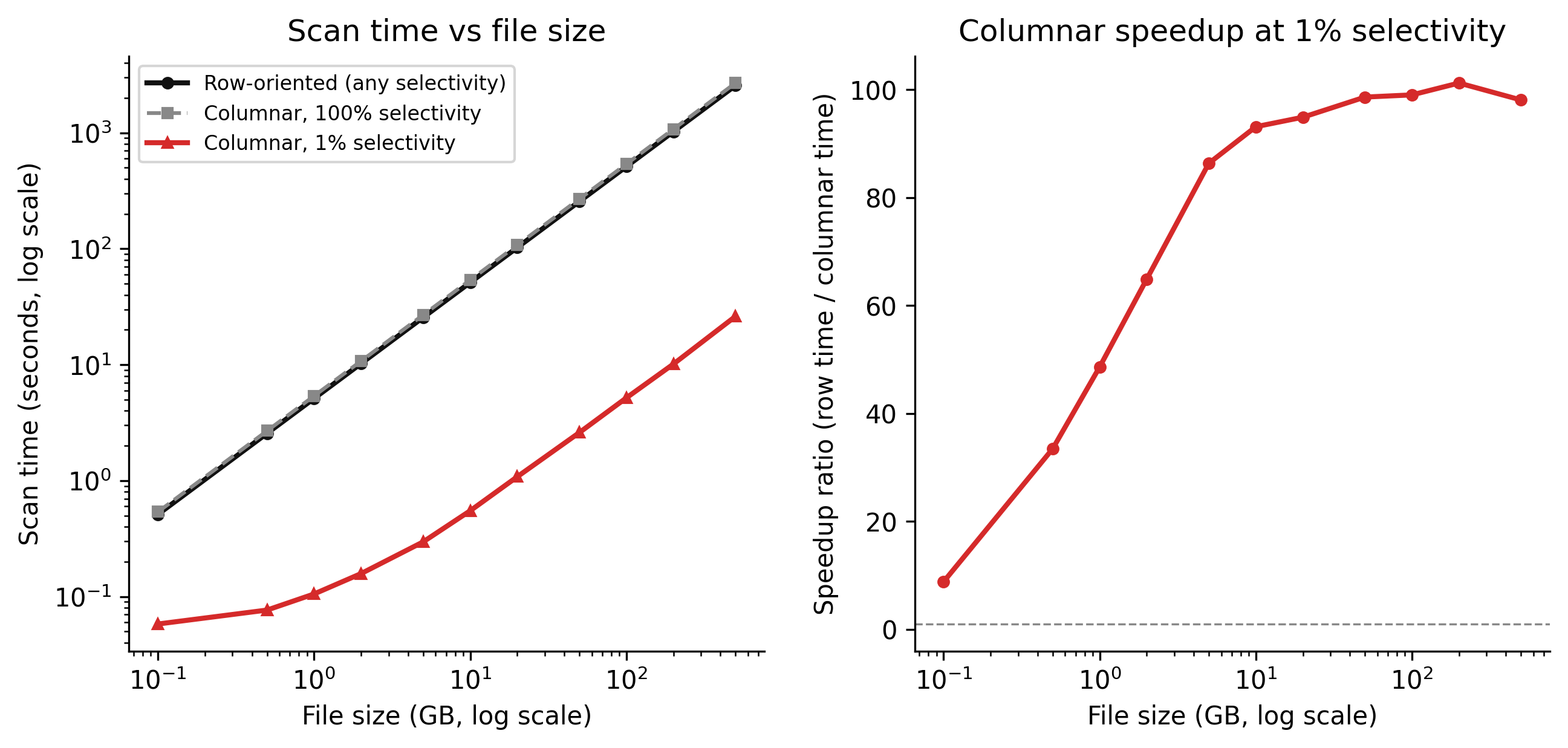
The chart below simulates scan time as a function of file size for row-oriented versus columnar storage, under two selectivity levels: a query that needs 1% of rows (selective) and one that needs 100% (full scan).

Code
import numpy as np
import matplotlib.pyplot as plt

rng = np.random.default_rng(42)

# Simulated file sizes in GB
file_sizes_gb = np.array([0.1, 0.5, 1, 2, 5, 10, 20, 50, 100, 200, 500])

# Row-oriented: always reads the full file regardless of selectivity
# Scan rate: ~200 MB/s (network-attached storage, realistic for cloud)
scan_rate_mb_s = 200
row_oriented_full = (file_sizes_gb * 1024) / scan_rate_mb_s  # seconds

# Columnar, 1% selectivity: reads ~1% of data + overhead for statistics
# At small file sizes, the overhead dominates; at large sizes, savings dominate
columnar_selective = (file_sizes_gb * 1024 * 0.01 + 0.5) / scan_rate_mb_s + 0.05

# Columnar, 100% selectivity: must read everything (no predicate pushdown benefit)
columnar_full = (file_sizes_gb * 1024) / scan_rate_mb_s * 1.05  # slight overhead vs row

# Add a little noise so lines don't look perfectly modelled
noise = rng.normal(0, 0.02, len(file_sizes_gb))
columnar_selective = np.maximum(columnar_selective + noise * columnar_selective, 0.01)

fig, axes = plt.subplots(1, 2, figsize=(9, 4.5), dpi=150)

# Left: absolute time
ax = axes[0]
ax.plot(file_sizes_gb, row_oriented_full,  color="#111111", linewidth=2,
        label="Row-oriented (any selectivity)", marker="o", markersize=4)
ax.plot(file_sizes_gb, columnar_full,       color="#888888", linewidth=1.5,
        linestyle="--", label="Columnar, 100% selectivity", marker="s", markersize=4)
ax.plot(file_sizes_gb, columnar_selective,  color="#d52a2a", linewidth=2,
        label="Columnar, 1% selectivity", marker="^", markersize=4)

ax.set_xscale("log")
ax.set_yscale("log")
ax.set_xlabel("File size (GB, log scale)")
ax.set_ylabel("Scan time (seconds, log scale)")
ax.set_title("Scan time vs file size")
ax.legend(fontsize=8)
ax.spines["top"].set_visible(False)
ax.spines["right"].set_visible(False)

# Right: speedup ratio columnar vs row at 1% selectivity
speedup = row_oriented_full / columnar_selective
ax2 = axes[1]
ax2.plot(file_sizes_gb, speedup, color="#d52a2a", linewidth=2, marker="o", markersize=4)
ax2.axhline(y=1, color="#888888", linestyle="--", linewidth=0.8, label="No speedup")
ax2.set_xscale("log")
ax2.set_xlabel("File size (GB, log scale)")
ax2.set_ylabel("Speedup ratio (row time / columnar time)")
ax2.set_title("Columnar speedup at 1% selectivity")
ax2.spines["top"].set_visible(False)
ax2.spines["right"].set_visible(False)

plt.tight_layout(pad=2.0)
plt.savefig("_assets/ch01-format-comparison.png", dpi=150, bbox_inches="tight")
plt.show()
Figure 2.1: Simulated scan time vs file size for row-oriented and columnar storage. At low selectivity (1% of rows needed), columnar storage with predicate pushdown reads a fraction of the data. At full selectivity (100% of rows needed), the formats converge — columnar storage provides no advantage if you need everything.

The speedup at 1% selectivity grows with file size because the fixed overhead of reading file statistics becomes a smaller fraction of the total cost as files get larger. A 10 GB GeoParquet file with 1% selectivity reads roughly 100 MB; the equivalent GeoJSON reads 10 GB. The 100× speedup in the chart is not an accident of parameter tuning — it reflects the physics of what happens when you store data in columns and track per-column statistics.


2.4 Schema design

Schema design for spatial analytics is not the same problem as schema design for a transactional application. A CRUD application lives or dies on write integrity: normalised tables, foreign keys, constraints that prevent bad data. A spatial analytics schema lives or dies on read performance: how many tables does a query have to join, how wide is the table, how many rows does it have to touch to answer a common question.

2.4.1 Wide tables versus normalised schemas

Consider a land-cover observations table. The normalised version spreads data across three tables:

CREATE TABLE acquisitions (
    acquisition_id   BIGINT PRIMARY KEY,
    acquired_at      TIMESTAMPTZ NOT NULL,
    satellite_id     INTEGER REFERENCES satellites(satellite_id),
    tile_id          VARCHAR(20) REFERENCES tiles(tile_id)
);

CREATE TABLE land_cover_classes (
    class_id    SMALLINT PRIMARY KEY,
    class_name  VARCHAR(50) NOT NULL,
    class_code  CHAR(4) NOT NULL
);

CREATE TABLE observations (
    observation_id  BIGINT PRIMARY KEY,
    acquisition_id  BIGINT REFERENCES acquisitions(acquisition_id),
    class_id        SMALLINT REFERENCES land_cover_classes(class_id),
    confidence      FLOAT4,
    geom            GEOMETRY(POLYGON, 4326)
);

A query asking “how many grassland pixels were acquired in Australia in 2023?” requires joining all three tables plus a spatial filter. The join itself is not expensive at 1000 rows. At 200 million rows, the join is planner-dependent and frequently produces bad estimates.

The analytical version denormalises into a single wide table:

CREATE TABLE spatial_observations (
    observation_id    BIGINT GENERATED ALWAYS AS IDENTITY PRIMARY KEY,
    acquired_at       TIMESTAMPTZ NOT NULL,
    satellite_name    VARCHAR(50) NOT NULL,
    tile_id           VARCHAR(20) NOT NULL,
    tile_h3_index     BIGINT,                        -- H3 level-8 cell index
    land_cover_class  VARCHAR(50) NOT NULL,
    land_cover_code   CHAR(4) NOT NULL,
    confidence        FLOAT4,
    bbox_minx         FLOAT8,
    bbox_miny         FLOAT8,
    bbox_maxx         FLOAT8,
    bbox_maxy         FLOAT8,
    geom              GEOMETRY(POLYGON, 4326) NOT NULL
);

-- Partition by year (see partitioning section)
-- GIST index on geometry (see Chapter 2)
-- B-tree index on acquired_at for time-range queries
CREATE INDEX idx_obs_acquired_at ON spatial_observations (acquired_at);

The redundancy (storing satellite_name as a string instead of a foreign key to a satellites table) is deliberate. A query that asks about satellite A never needs to know satellite B exists. The string is stored once per row; the join is eliminated entirely.

The tradeoff: if satellite names change (they do, through rebranding or renaming), you update many rows instead of one. For a read-heavy analytics workload where names are stable, this is a good trade. The choice depends on the read-to-write ratio and whether updates happen. Know your workload before you normalise.

2.4.2 Star schema for spatial analytics

The pattern above — a central fact table surrounded by dimension tables that are usually joined in queries — is called a star schema. The “facts” are measurements (observations, events, readings). The “dimensions” are the contexts that give facts meaning (time, location, instrument, source).

For spatial systems the location dimension is different from every other dimension. It is not just a foreign key to a locations table — it carries geometric data that enables spatial joins, proximity queries, and containment tests. The geometry column belongs in the fact table, not in a separate dimension table, because every spatial query needs it.

The time dimension usually belongs as a timestamp column in the fact table for the same reason: time-range queries are the most common filter, and a join to a dates table for every such query is not free.

What you do separate into dimension tables: slowly changing reference data that truly benefits from normalisation. Sensor calibration parameters. Land-cover classification hierarchies (class A belongs to super-class B, which belongs to super-class C). These change infrequently and would bloat the fact table with repeated multi-column structures.


2.5 Partitioning strategy

Partitioning is the practice of dividing a table or file collection into named segments so that queries can identify and skip irrelevant segments without reading them. The segments do not change the data — they change how the data is organised on disk.

Three partitioning strategies matter for spatial data.

2.5.1 Time partitioning

Time is the most common dimension for analytical queries. “Show me observations from January 2024” should not read January 2020 data. If the data is partitioned by year and month, the query planner can identify which partitions contain the requested time range and open only those.

In PostgreSQL, declarative partitioning by range is straightforward:

CREATE TABLE spatial_observations (
    observation_id  BIGINT NOT NULL,
    acquired_at     TIMESTAMPTZ NOT NULL,
    tile_id         VARCHAR(20) NOT NULL,
    land_cover_code CHAR(4) NOT NULL,
    confidence      FLOAT4,
    geom            GEOMETRY(POLYGON, 4326)
) PARTITION BY RANGE (acquired_at);

CREATE TABLE spatial_observations_2023
    PARTITION OF spatial_observations
    FOR VALUES FROM ('2023-01-01') TO ('2024-01-01');

CREATE TABLE spatial_observations_2024
    PARTITION OF spatial_observations
    FOR VALUES FROM ('2024-01-01') TO ('2025-01-01');

A query with WHERE acquired_at >= '2024-01-01' AND acquired_at < '2024-04-01' will touch only the 2024 partition. The 2023 partition is not opened.

2.5.2 Spatial partitioning

Time partitioning works when queries are time-selective. For spatially-selective queries — “show me all observations within 50km of this point” — a spatial partition is what prunes irrelevant data.

The two practical schemes are H3 cells and quadkeys. H3 is Uber’s hierarchical hexagonal grid; at resolution 5, each cell covers approximately 252 km². A spatial observation can be assigned to an H3 cell at index time:

import h3

def assign_h3_index(lon: float, lat: float, resolution: int = 5) -> int:
    """Return the H3 index as an integer for a point at (lon, lat)."""
    return int(h3.latlng_to_cell(lat, lon, resolution), 16)

Storing the H3 index as a BIGINT column allows B-tree indexing and equality queries. A query for a specific region finds all H3 cells that intersect the region, then filters by tile_h3_index IN (...). This is fast because it uses the B-tree index rather than the GIST index — the spatial index is used only to confirm exact geometry, not to find candidates.

Quadkeys work on the same principle using a different grid: each level of the quadkey divides the world into four quadrants, doubling resolution. Quadkeys are strings, which makes them slightly less efficient for B-tree indexing than H3 integers, but they have broader tool support.

2.5.3 Compound partitioning

For large datasets, combine time and spatial partitioning. Partition by year at the top level, then by H3 cell range within each year. A query that asks for data from 2024 in a specific region touches one year partition, then uses the H3 index to limit rows within that partition.

This is where the initial architecture decision has compounding effects. The consultancy team that stored data as GeoJSON in a flat directory had no partitioning at all. Their 1.4 TB of data was effectively one partition. Every query read everything.


2.6 Data catalogues

A data catalogue is a registry: a record of what datasets exist, where they are stored, what schema they have, who maintains them, and when they were last updated. It is not a query engine and not a data warehouse. It is the index.

The reason catalogues matter is that schema drift kills data products silently. When a data source adds a column, renames a field, or changes a unit of measurement, a pipeline that consumed the old schema does not immediately fail — it silently produces wrong results. The consultancy team’s pipeline had four undocumented schema versions because the team added fields without updating any central record. Two years later, no one could say which files used which schema.

A catalogue prevents this not by enforcing schema (that is a data quality problem, Chapter 7) but by making schema an explicit, versioned, queryable artifact. When a consumer reads from a dataset, it reads the catalogue entry first and validates that the schema it expects matches the schema the catalogue records. Mismatches become visible instead of silent.

2.6.1 What a catalogue entry contains

A minimal catalogue entry needs:

  • Dataset identifier (unique, stable)
  • Human-readable description
  • Storage location (path, bucket, or connection string)
  • Format (GeoParquet, GeoJSON, PostGIS table, etc.)
  • Schema version (a number or hash)
  • Column definitions: name, type, nullable, description
  • Spatial extent (bounding box, CRS)
  • Temporal extent (earliest and latest record dates)
  • Owner and contact
  • Last validated timestamp

JSON is a perfectly adequate format for a small catalogue. The important thing is that it is machine-readable, version-controlled, and checked before any pipeline reads from or writes to the dataset.

2.6.2 A minimal JSON catalogue

{
  "datasets": [
    {
      "id": "land_cover_aus_2024",
      "description": "Satellite-derived land cover classifications, Australia, 2024",
      "location": "s3://spatial-data/land-cover/aus/2024/",
      "format": "GeoParquet",
      "schema_version": 3,
      "crs": "EPSG:4326",
      "spatial_extent": {
        "minx": 112.9,
        "miny": -43.7,
        "maxx": 153.6,
        "maxy": -10.7
      },
      "temporal_extent": {
        "start": "2024-01-01",
        "end": "2024-12-31"
      },
      "columns": [
        {"name": "observation_id", "type": "int64",   "nullable": false, "description": "Unique observation identifier"},
        {"name": "acquired_at",    "type": "timestamp","nullable": false, "description": "UTC acquisition timestamp"},
        {"name": "tile_id",        "type": "string",  "nullable": false, "description": "Satellite tile identifier"},
        {"name": "land_cover_code","type": "string",  "nullable": false, "description": "Land cover class code, LCCS standard"},
        {"name": "confidence",     "type": "float32", "nullable": true,  "description": "Classifier confidence, 0–1"},
        {"name": "geometry",       "type": "geometry","nullable": false,  "description": "Polygon in WGS84"}
      ],
      "owner": "platform-team",
      "last_validated": "2025-03-15T09:00:00Z"
    }
  ]
}

2.6.3 A Python catalogue reader

import json
from pathlib import Path
from datetime import datetime


def load_catalogue(path: str | Path) -> dict:
    """Load a JSON catalogue and return as a dict keyed by dataset ID."""
    with open(path) as f:
        raw = json.load(f)
    return {d["id"]: d for d in raw["datasets"]}


def get_dataset(catalogue: dict, dataset_id: str) -> dict:
    """Retrieve a dataset entry or raise KeyError if not found."""
    if dataset_id not in catalogue:
        raise KeyError(
            f"Dataset '{dataset_id}' not in catalogue. "
            f"Available: {list(catalogue.keys())}"
        )
    return catalogue[dataset_id]


def expected_columns(catalogue: dict, dataset_id: str) -> dict[str, str]:
    """Return {column_name: type} for a dataset."""
    entry = get_dataset(catalogue, dataset_id)
    return {col["name"]: col["type"] for col in entry["columns"]}


def check_schema_version(catalogue: dict, dataset_id: str, expected_version: int) -> None:
    """Raise if the catalogue schema version does not match what the consumer expects."""
    entry = get_dataset(catalogue, dataset_id)
    actual = entry.get("schema_version", 0)
    if actual != expected_version:
        raise ValueError(
            f"Schema version mismatch for '{dataset_id}': "
            f"consumer expects v{expected_version}, catalogue records v{actual}. "
            "Update your consumer or flag for schema review."
        )

The pattern is simple: before any pipeline reads a dataset, it calls check_schema_version. If the schema has been updated and the consumer has not been, the mismatch surfaces immediately as a raised exception rather than silently corrupted output.


2.7 What to try

TipWhat to try
  1. Vary the selectivity. In the interactive cell below, selectivity is the fraction of rows a query needs (0.01 = 1%). Drag it from 0.01 to 0.5 to 1.0. Notice that at high selectivity, the columnar advantage disappears — predicate pushdown only helps if most data can be skipped.

  2. Change columns_wide and columns_columnar. The columnar format reads only the columns a query needs. Set columns_columnar = 3 (you need three columns) versus columns_wide = 50 (the table is 50 columns wide). The fraction of data read drops by 50/3 ≈ 16×. Change columns_columnar to 50 and watch the advantage vanish.

  3. Simulate a large dataset. Set n_rows to 500_000_000 (500 million rows). At 1% selectivity, the row-oriented scan reads 5 million rows worth of data — but it has to open every row to find them. What happens to absolute scan time at this scale?

# --- Try changing these parameters ---
n_rows           = 10_000_000   # total rows in the dataset
selectivity      = 0.01         # fraction of rows the query needs (0.01 = 1%)
columns_wide     = 50           # total columns in the table
columns_columnar = 5            # columns the query actually reads
bytes_per_value  = 8            # bytes per column value (float64 or int64)
scan_rate_mb_s   = 200          # simulated I/O throughput in MB/s
# --- End of parameters ---

import numpy as np
import matplotlib.pyplot as plt

selectivities = np.linspace(0.01, 1.0, 50)

def scan_time_row(sel, n, cols_wide, bpv, rate_mb_s):
    """Row-oriented: must read every row to find matching ones."""
    total_bytes = n * cols_wide * bpv
    return (total_bytes / 1e6) / rate_mb_s  # seconds (constant — always full scan)

def scan_time_columnar(sel, n, cols_wide, cols_needed, bpv, rate_mb_s):
    """Columnar: reads only needed columns, skips non-matching row groups."""
    # Fraction of data that must be read: columns needed / total columns
    col_fraction = cols_needed / cols_wide
    # Predicate pushdown skips (1 - sel) fraction of row groups (approximately)
    # Small fixed overhead for reading statistics
    effective_fraction = col_fraction * (sel + 0.05)  # 0.05 = overhead for stats
    total_bytes = n * cols_wide * bpv
    return (total_bytes * effective_fraction / 1e6) / rate_mb_s

row_times = np.array([scan_time_row(s, n_rows, columns_wide, bytes_per_value, scan_rate_mb_s)
                      for s in selectivities])
col_times = np.array([scan_time_columnar(s, n_rows, columns_wide, columns_columnar,
                                          bytes_per_value, scan_rate_mb_s)
                      for s in selectivities])

speedup = row_times / np.maximum(col_times, 1e-6)

fig, (ax1, ax2) = plt.subplots(1, 2, figsize=(9, 4))

ax1.plot(selectivities * 100, row_times, color="#111111", linewidth=2,
         label=f"Row-oriented ({columns_wide} cols)")
ax1.plot(selectivities * 100, col_times, color="#d52a2a", linewidth=2,
         label=f"Columnar ({columns_columnar} of {columns_wide} cols)")
ax1.set_xlabel("Selectivity (% of rows returned)")
ax1.set_ylabel("Estimated scan time (seconds)")
ax1.set_title(f"Scan time  •  {n_rows:,} rows")
ax1.legend(fontsize=8)
ax1.spines["top"].set_visible(False)
ax1.spines["right"].set_visible(False)

ax2.plot(selectivities * 100, speedup, color="#d52a2a", linewidth=2)
ax2.axhline(y=1, color="#888888", linestyle="--", linewidth=0.8)
ax2.set_xlabel("Selectivity (% of rows returned)")
ax2.set_ylabel("Speedup (row time / columnar time)")
ax2.set_title("Columnar speedup ratio")
ax2.spines["top"].set_visible(False)
ax2.spines["right"].set_visible(False)

plt.tight_layout()
plt.show()

print(f"At {selectivity*100:.0f}% selectivity:")
t_row = scan_time_row(selectivity, n_rows, columns_wide, bytes_per_value, scan_rate_mb_s)
t_col = scan_time_columnar(selectivity, n_rows, columns_wide, columns_columnar,
                            bytes_per_value, scan_rate_mb_s)
print(f"  Row-oriented:  {t_row:.2f} s")
print(f"  Columnar:      {t_col:.2f} s")
print(f"  Speedup:       {t_row/max(t_col, 1e-6):.1f}×")

2.8 Exercises

1.1 — Format selection

You are designing a pipeline for a road traffic sensor network. Sensors report a GPS point, a vehicle count, and a speed estimate every 30 seconds. The data is consumed by two systems: a real-time dashboard that reads the last 60 seconds, and an analytical system that runs daily aggregations over 12 months of history.

  1. What storage format would you choose for the analytical store? Justify your answer in terms of query access pattern and selectivity.
  2. The analytical system needs to answer: “What was the average speed on highway segments in the northeast region during morning peak hours in Q3?” Which partitioning strategy (time, spatial, compound) minimises data read? Explain why.
  3. The current team stores data as daily GeoJSON files, one file per sensor. Estimate the fraction of data read by a query for one sensor over one week if there are 500 sensors and two years of data. How does this compare to a time-partitioned GeoParquet layout?

1.2 — Schema design

A team is designing a spatial observations table for satellite-derived sea surface temperature (SST). Each observation has: a geometry (point), an acquisition timestamp, a satellite identifier, an instrument identifier, a temperature value, a quality flag, and a confidence score.

  1. Write the SQL DDL for a wide-table (denormalised) design appropriate for analytical queries. Include appropriate column types. Which columns would you index, and why?
  2. The team estimates 200 million observations per year. If each observation is approximately 100 bytes in a denormalised row, how large is one year of data? How does this change your partitioning choice?
  3. A new data source adds a cloud_fraction field. Describe the steps required to update the schema in a way that is backward-compatible for existing consumers.

1.3 — Catalogue design

An organisation has three spatial datasets: a roads network (GeoParquet, stable schema, updated monthly), a buildings footprint dataset (GeoParquet, schema changed three times in two years), and a real-time sensor feed (PostGIS table, updated every 30 seconds).

  1. For each dataset, identify the most important fields in a catalogue entry. Are they the same for all three? Explain what differs.
  2. How would you represent schema version history in the JSON catalogue format shown in this chapter? Sketch a JSON structure that records the current schema and the previous two versions.
  3. A pipeline fails because it expects schema version 2 of the buildings dataset but the catalogue records version 3. What information would the error message need to include for the pipeline maintainer to diagnose and fix the problem quickly?

1.4 — Partitioning trade-offs

A GeoParquet file stores 50 million polygon observations globally, partitioned by H3 level-5 cell (approximately 252 km² per cell, roughly 2 million cells worldwide). The dataset covers five years of data.

  1. A query asks for all observations in a specific H3 cell for a specific year. How many partitions does the query need to open if the partitioning is (i) by H3 cell only, (ii) by year only, (iii) by year then H3 cell? Assume data is roughly uniform across cells and years.
  2. The query engine opens a partition and uses the GIST spatial index to narrow results further. Explain the two-pass filter (index filter then geometry refinement) and why it is more efficient than a direct geometry comparison across all rows.
  3. What is the risk of over-partitioning (creating too many small partitions)? What is a practical lower bound on partition size for a cloud object store?

2.9 Build this

Write a JSON data catalogue schema and a Python function that validates a GeoParquet file against the schema. The validator should check: (1) all required columns are present, (2) column types match the catalogue, (3) the spatial extent of the file falls within the catalogued extent. Return a structured validation report.

import json
from pathlib import Path
from typing import Any


# ── Catalogue schema ──────────────────────────────────────────────────────────

CATALOGUE_SCHEMA = {
    "$schema": "https://json-schema.org/draft/2020-12",
    "type": "object",
    "required": ["datasets"],
    "properties": {
        "datasets": {
            "type": "array",
            "items": {
                "type": "object",
                "required": ["id", "description", "location", "format",
                             "schema_version", "crs", "spatial_extent",
                             "temporal_extent", "columns", "owner"],
                "properties": {
                    "id":             {"type": "string"},
                    "description":    {"type": "string"},
                    "location":       {"type": "string"},
                    "format":         {"type": "string",
                                       "enum": ["GeoParquet", "GeoJSON",
                                                "Shapefile", "PostGIS"]},
                    "schema_version": {"type": "integer", "minimum": 1},
                    "crs":            {"type": "string"},
                    "spatial_extent": {
                        "type": "object",
                        "required": ["minx", "miny", "maxx", "maxy"],
                        "properties": {
                            "minx": {"type": "number"},
                            "miny": {"type": "number"},
                            "maxx": {"type": "number"},
                            "maxy": {"type": "number"}
                        }
                    },
                    "temporal_extent": {
                        "type": "object",
                        "required": ["start", "end"],
                        "properties": {
                            "start": {"type": "string", "format": "date"},
                            "end":   {"type": "string", "format": "date"}
                        }
                    },
                    "columns": {
                        "type": "array",
                        "items": {
                            "type": "object",
                            "required": ["name", "type", "nullable"],
                            "properties": {
                                "name":        {"type": "string"},
                                "type":        {"type": "string"},
                                "nullable":    {"type": "boolean"},
                                "description": {"type": "string"}
                            }
                        }
                    },
                    "owner":          {"type": "string"},
                    "last_validated": {"type": "string"}
                }
            }
        }
    }
}


# ── Parquet type mapping ───────────────────────────────────────────────────────
# Maps catalogue type strings to sets of acceptable pyarrow/pandas dtype strings.

CATALOGUE_TO_ARROW_TYPES: dict[str, set[str]] = {
    "int32":     {"int32", "int32[pyarrow]"},
    "int64":     {"int64", "int64[pyarrow]"},
    "float32":   {"float32", "float[pyarrow]"},
    "float64":   {"float64", "double[pyarrow]"},
    "string":    {"object", "string", "large_string", "string[pyarrow]"},
    "timestamp": {"datetime64[ns]", "datetime64[us]", "timestamp[us][pyarrow]",
                  "timestamp[ns][pyarrow]"},
    "boolean":   {"bool", "bool[pyarrow]"},
    "geometry":  {"object", "binary", "large_binary"},   # WKB stored as binary
}


# ── Validation ─────────────────────────────────────────────────────────────────

class ValidationError:
    """A single validation finding."""
    def __init__(self, level: str, field: str, message: str):
        self.level   = level    # "error" | "warning"
        self.field   = field
        self.message = message

    def __repr__(self) -> str:
        return f"[{self.level.upper()}] {self.field}: {self.message}"


def validate_geoparquet(
    parquet_path: str | Path,
    catalogue_path: str | Path,
    dataset_id: str,
) -> dict[str, Any]:
    """
    Validate a GeoParquet file against a catalogue entry.

    Parameters
    ----------
    parquet_path:    Path to the .parquet file to validate.
    catalogue_path:  Path to the JSON catalogue file.
    dataset_id:      The catalogue dataset ID to validate against.

    Returns
    -------
    A dict with keys:
        "dataset_id"  : str
        "parquet_path": str
        "valid"       : bool   (True only if no errors)
        "findings"    : list of ValidationError objects
        "summary"     : str
    """
    try:
        import pyarrow.parquet as pq
    except ImportError:
        raise ImportError(
            "pyarrow is required for GeoParquet validation. "
            "Install it with: pip install pyarrow"
        )

    findings: list[ValidationError] = []

    # ── Load catalogue ──────────────────────────────────────────────────────
    with open(catalogue_path) as f:
        raw = json.load(f)

    datasets_by_id = {d["id"]: d for d in raw.get("datasets", [])}
    if dataset_id not in datasets_by_id:
        findings.append(ValidationError(
            "error", "catalogue",
            f"Dataset '{dataset_id}' not found in catalogue at {catalogue_path}. "
            f"Available IDs: {list(datasets_by_id.keys())}"
        ))
        return _report(dataset_id, str(parquet_path), findings)

    entry = datasets_by_id[dataset_id]
    expected_columns = {col["name"]: col for col in entry["columns"]}
    expected_extent  = entry["spatial_extent"]

    # ── Read Parquet schema ─────────────────────────────────────────────────
    try:
        pf = pq.read_metadata(parquet_path)
        schema = pq.read_schema(parquet_path)
    except Exception as exc:
        findings.append(ValidationError(
            "error", "parquet_file",
            f"Could not read Parquet file: {exc}"
        ))
        return _report(dataset_id, str(parquet_path), findings)

    actual_columns = {field.name: str(field.type) for field in schema}

    # ── Check 1: required columns present ──────────────────────────────────
    for col_name, col_def in expected_columns.items():
        if col_name not in actual_columns:
            findings.append(ValidationError(
                "error", f"column:{col_name}",
                f"Required column '{col_name}' (type: {col_def['type']}) "
                "is missing from the Parquet file."
            ))

    # ── Check 2: column types match ─────────────────────────────────────────
    for col_name, col_def in expected_columns.items():
        if col_name not in actual_columns:
            continue  # already flagged above
        catalogue_type = col_def["type"]
        actual_type    = actual_columns[col_name]
        acceptable     = CATALOGUE_TO_ARROW_TYPES.get(catalogue_type, set())
        # Normalise: strip whitespace and lower-case for comparison
        actual_norm = actual_type.strip().lower()
        acceptable_norm = {t.lower() for t in acceptable}
        if acceptable_norm and actual_norm not in acceptable_norm:
            findings.append(ValidationError(
                "error", f"column:{col_name}",
                f"Type mismatch: catalogue records '{catalogue_type}', "
                f"Parquet file has '{actual_type}'. "
                f"Acceptable Arrow types: {sorted(acceptable)}"
            ))

    # ── Check 3: spatial extent ─────────────────────────────────────────────
    # GeoParquet stores bbox in file-level metadata under "geo" key
    file_meta = pf.metadata.get("geo") if pf.metadata else None
    if file_meta is None:
        findings.append(ValidationError(
            "warning", "spatial_extent",
            "No 'geo' metadata key found in Parquet file. "
            "Cannot validate spatial extent. "
            "File may not be a valid GeoParquet file."
        ))
    else:
        try:
            geo = json.loads(file_meta)
            # GeoParquet spec: geo.columns.<primary>.bbox = [minx, miny, maxx, maxy]
            primary_col = geo.get("primary_column", "geometry")
            col_meta    = geo.get("columns", {}).get(primary_col, {})
            file_bbox   = col_meta.get("bbox")
            if file_bbox is None:
                findings.append(ValidationError(
                    "warning", "spatial_extent",
                    f"No bbox found for primary geometry column '{primary_col}' "
                    "in GeoParquet metadata."
                ))
            else:
                fminx, fminy, fmaxx, fmaxy = file_bbox
                cminx = expected_extent["minx"]
                cminy = expected_extent["miny"]
                cmaxx = expected_extent["maxx"]
                cmaxy = expected_extent["maxy"]
                tolerance = 0.001  # degrees — for floating point comparison

                if (fminx < cminx - tolerance or fminy < cminy - tolerance or
                        fmaxx > cmaxx + tolerance or fmaxy > cmaxy + tolerance):
                    findings.append(ValidationError(
                        "error", "spatial_extent",
                        f"File spatial extent [{fminx:.4f}, {fminy:.4f}, "
                        f"{fmaxx:.4f}, {fmaxy:.4f}] "
                        f"exceeds catalogued extent [{cminx}, {cminy}, {cmaxx}, {cmaxy}]. "
                        "Data may be outside the expected geographic region."
                    ))
        except (json.JSONDecodeError, KeyError, TypeError) as exc:
            findings.append(ValidationError(
                "warning", "spatial_extent",
                f"Could not parse GeoParquet 'geo' metadata: {exc}"
            ))

    return _report(dataset_id, str(parquet_path), findings)


def _report(dataset_id: str, parquet_path: str,
            findings: list[ValidationError]) -> dict[str, Any]:
    errors   = [f for f in findings if f.level == "error"]
    warnings = [f for f in findings if f.level == "warning"]
    valid    = len(errors) == 0
    summary  = (
        f"{'VALID' if valid else 'INVALID'}: "
        f"{len(errors)} error(s), {len(warnings)} warning(s)"
    )
    return {
        "dataset_id":   dataset_id,
        "parquet_path": parquet_path,
        "valid":        valid,
        "findings":     findings,
        "summary":      summary,
    }


# ── Usage example ──────────────────────────────────────────────────────────────

if __name__ == "__main__":
    result = validate_geoparquet(
        parquet_path   = "data/land_cover_aus_2024.parquet",
        catalogue_path = "catalogue.json",
        dataset_id     = "land_cover_aus_2024",
    )
    print(result["summary"])
    for finding in result["findings"]:
        print(f"  {finding}")
The validator is intentionally narrow. It checks three things and reports them precisely. Production catalogues add: row count validation, null frequency checks, and temporal extent verification. Those are Chapter 7 (data quality). The structural checks here — column presence, type compatibility, spatial extent — are what a pipeline should check before it starts reading data, not after it has already loaded 50 GB into memory and produced wrong output.